Knowledge
What are Conversational Forms? A Complete Guide

TRUSTED BY BEST-IN-CLASS BRANDS



Conversational forms boost engagement and improve response rate. That’s a proven fact!
Just think about it. Would you rather have your favorite brand/product/service send out bland, long checkbox surveys through automated emails or hop on for a chat over coffee? I’d choose the latter. I love a heart-to-heart conversation, and so do your customers.
However, you need to have a detailed understanding of these forms. You should also know their impact on your response rate, the challenges they pose, and the best practices to follow.
(I’ll also add a free template for you to test and a guide to creating one easily with SurveySparrow!)
Let’s get started!
What are Conversational Forms?
Do you have that one person with whom conversations flow from one topic to the other? There is no force or pretension. Everything unfolds one at a time. That’s exactly what conversational forms do!
A Conversational Form is a data collection tool that gathers data by mimicking human-like conversations. Here, a dynamic exchange happens between a form and the user, one question at a time.
These forms increase the response rate by thoroughly engaging the audience. As a respondent answers, the form adapts accordingly and gives personalized replies.
Here’s a free sample form created with SurveySparrow for you to test. They are fully customizable and guarantee 40% more responses.
Restaurant Order Form Template
Use This TemplateFeatures
Let’s look at the components that make them so hooking!
- They are fully Customizable! You can easily match the flow of your form with your brand’s voice and tone.
- Have a natural flow to the conversations. Nothing seems mechanical.
- They adapt to the context by decoding user interaction.
- Progressive Disclosure! They take their sweet time, unlike traditional forms that simultaneously overwhelm you with many questions.
So, why are they so crucial? Here we go…
Importance of Conversational Forms
I remember receiving a form in my inbox a few years back. It was from a brand I held close to my heart. But guess what it is doing now? Abandoned and lying in trash. Or perhaps deleted.
That’s the problem. Most of us have the attention span of a goldfish! (and memory, too.) We can’t sit through hours of filling long, tedious forms.
Let’s see how chat-like forms solve this issue!
- Creates a human-like experience for website visitors. Come to think of it- you would feel a bit more connected if you feel like it is another fellow being that’s conversing from the other end than a machine, right? Though it’s all in the head, it works.
- It helps you fill the sales pipeline with better leads. Moreover, the chances of getting interested and qualified potential customers are much higher than in traditional forms.
Read More: Top 21 Lead Generation Tools
- The best part is that it can reduce the time and effort you must put into sales. Not that you can pause it, but you’ll get a better balance.
- That’s not it. With these forms, you can personalize the content to specific segments. Rather than working on a set template, you can create unique experiences for particular demographics.
Top-notch, right?
Moving on…
There’s one thing you need to know before we dive deep.
Conversational Forms vs Single Page Forms
We are not just talking about the form’s use cases here. I want to stress the difference between the three forms that vary in layout and design. There are three broad categories: conversational and single-page.
We’ve already discussed the latter. Let’s not get there for a moment.
I think a table would do better, right?
So…
| Aspect | Conversational Forms | Single-Page Forms |
|---|---|---|
| Presentation | Questions one at a time, like a chat | All fields on one screen |
| User Experience | Engaging, not overwhelming | Efficient, all visible |
| Language and Tone | Casual, everyday tone | Formal, structured |
| Personalization | Tailored to user input | Limited |
| Adaptive Responses | Adjusts to user input | Static structure |
| Visual Elements | Interactive, engaging | Some visuals |
| Mobile-Friendly Design | Strong focus on mobile | Responsive, may lack optimization |
| Usability | User-friendly but unpredictable | Clear and easy |
Did you get the gist?
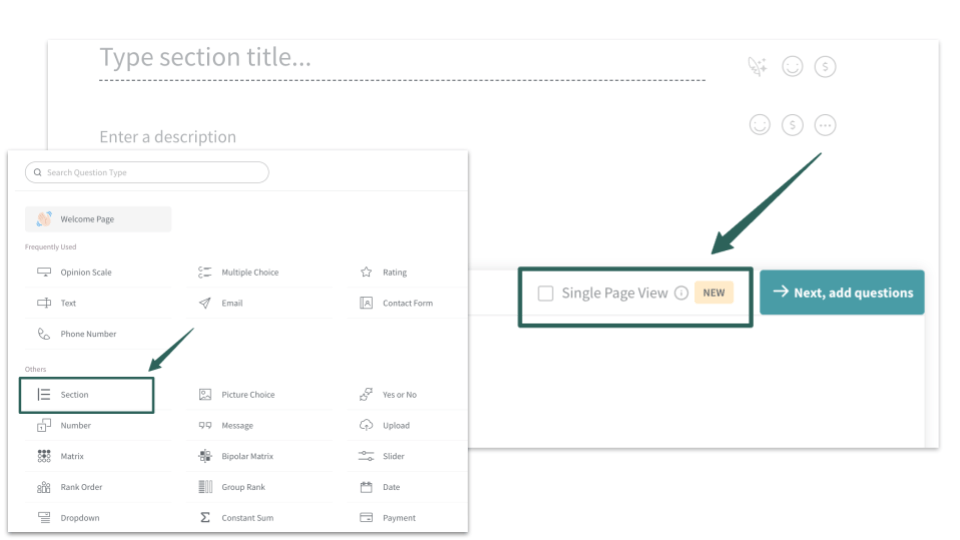
Now, we can’t say one is better than the other. Each has its purpose, and sometimes, we can’t replace it. What we need to do is choose a tool that has it all. You can consider using SurveySparrow. You have already seen the chat-like survey. But if you want to create single-page forms, that’s possible too!
All you need to do is add a “section” from the question types while creating the form and check the “single page view” checkbox.
You can sign up to create a survey on your own or use the 1000+ pre-designed survey templates in the library.
Why don’t you start with a 14-day free trial to get a feel of the platform?

I’ve also included a step-by-step guide at the end of the blog. Check it out before you start!
Benefits of Conversational Forms
- They boost engagement by walking you through each question, one at a time. There’s no hurry, but you can still keep your customers hooked!
- There will be a significant surge in loyalty and trust. Let me tell you why. When your customers feel a sense of familiarity with the human-like chat, there’s a huge possibility that they’ll feel like they belong. Familiarity builds comfort, which further creates a strong bond.
- The most important point is that it reduces distraction. The respondent will likely feel overwhelmed when the page is filled with questions. By giving them time, you are allowing them to focus.
Best Practices to Follow
Let me share what works for me. Maybe you can combine our ways and create something unique!
- Make the forms user-centered. Draft (or craft) the questions with the user in mind.
- Know your audience like the back of your hand. When you personalize the questions for a specific section or demographic, do not take anything for granted.
- This brings us to… doing thorough research. Surface knowledge is not going to do any good here.
- It is also vital to have a clear structure to your forms. Disorder might be in our blood, but let’s not do that to our forms!
- Oh, I forgot one thing. Have a clear idea of what you want to achieve before creating the questions. We don’t want confused customers roaming around wondering what this beautiful form is about, right?
Challenges and Pitfalls of Conversational Forms
What do you think might be the most common challenge?
- Yes, you guessed it right. It can be a bit time-consuming for users.
- If not structured well and to the point, it can go off-topic. This is why you should have a clear picture of your goals.
- As much fun as it sounds, balancing efficiency and personalization can be daunting. In-depth details can also be confusing!
- Users might also be a bit apprehensive about chat-like forms, which can catch them off guard.
All these issues can be fixed if you have an advanced tool to back you up. A form builder will help you with creation and be with you at every step- collection, visualization, and analysis!
Here you go!
Create a Conversational Form with SurveySparrow
Well, building a no-code conversational form is not as complicated as you think. Especially with SurveySparrow, it’s just a few clicks and mouse drags!
Let’s see how we do it here:
Step 1: Sign in
Log in to your SurveySparrow account and get started.
If you don’t have one, there’s never a wrong time. Sign up for free today!
Once that’s done, it’s time to
Step 2: Create
If you wish to create a new form all on your own, click “+New Survey.”
For customizing a pre-designed template, tap “Browse Classic Templates” and search for the one you want. You can also practice with the free template that I attached above.
Next up…
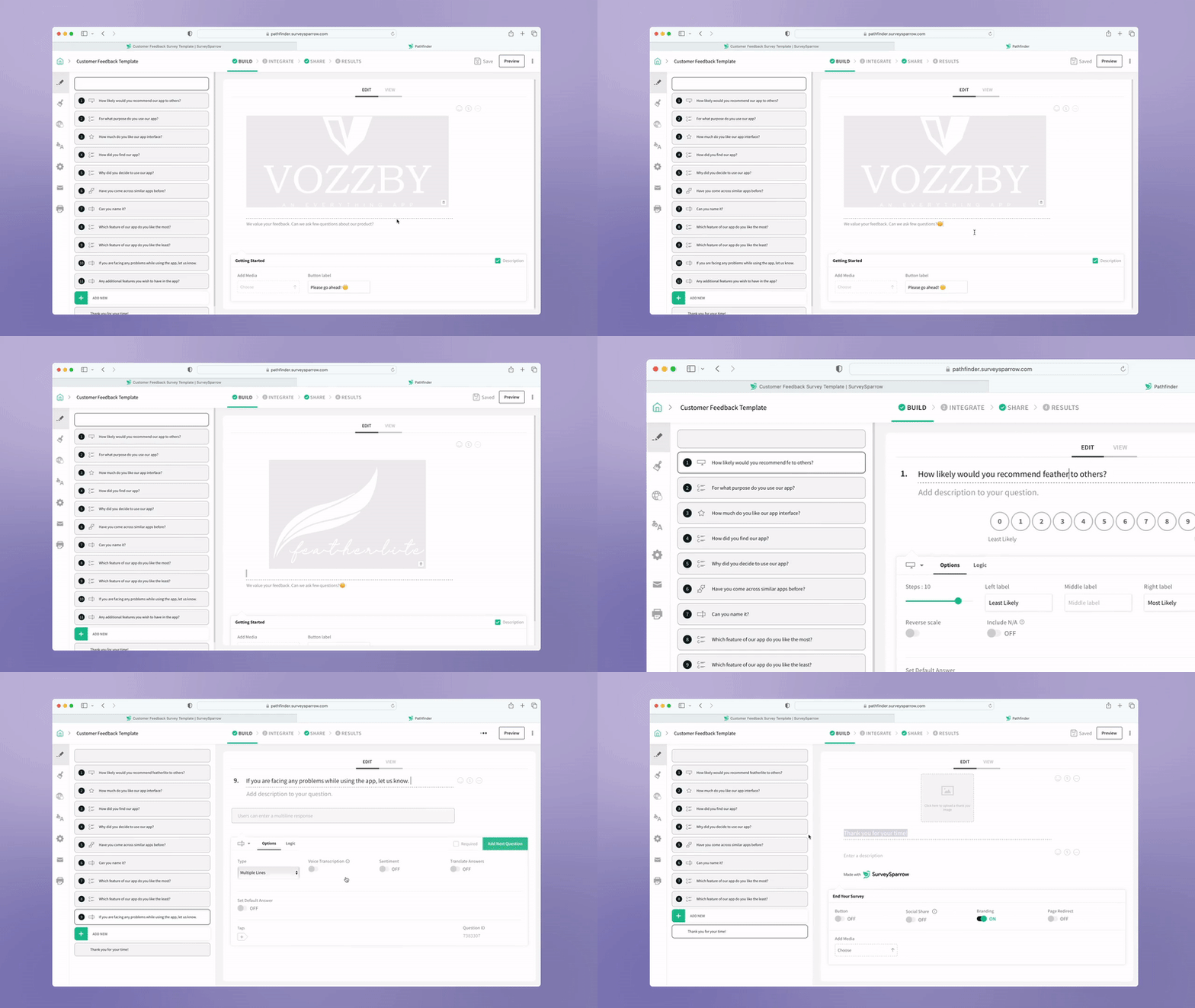
Step 3: Customize
Play around with the form! You can remove the irrelevant questions, add new ones that suit your taste, or edit the existing ones.
You can use a wing feature to compress, expand, rephrase, reword, and do anything you wish with the pre-filled questions!
Here’s how you do it:
Step 4: Integrate
Don’t just stop there!
Connect your form with popular tools like Mailchimp, HubSpot, Zapier, or Salesforce to streamline your workflow.
Step 5: Share
That’s it. Your Conversational Form is ready to be filled out. You can send it via email, WhatsApp, SMS, social media, QR code, or embed it on your website.
Wasn’t that easy?
Once the responses start flowing in, you can use the executive dashboard to visualize the data and make informed decisions.
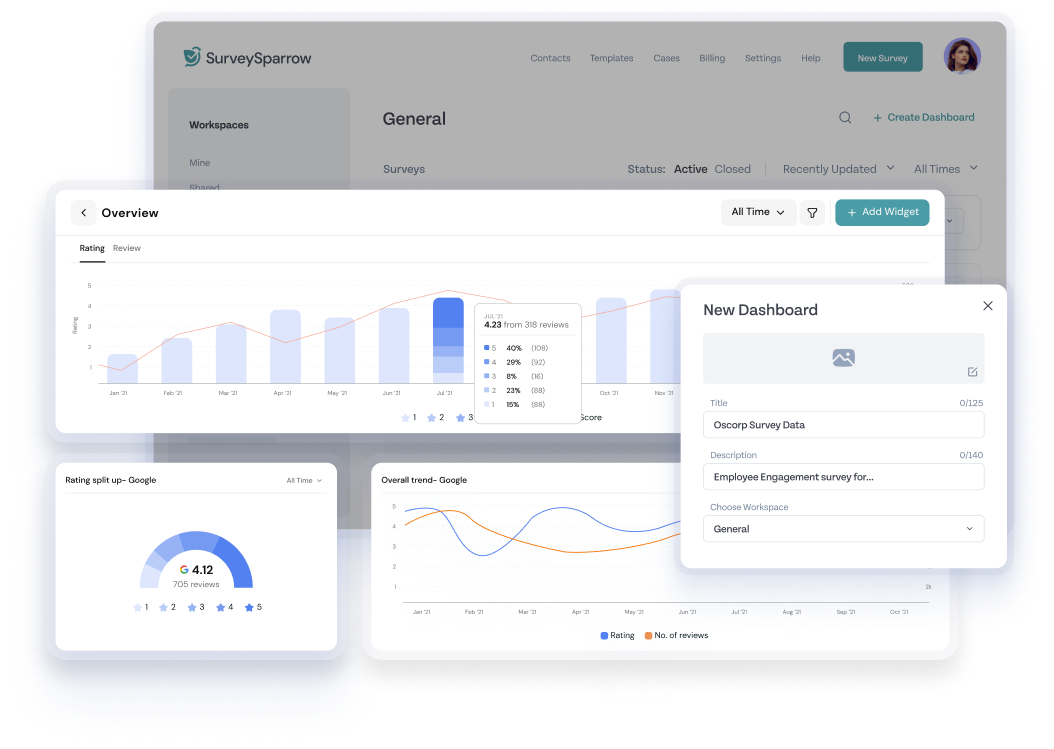
And with the latest AI-powered Text Analytics feature, Cognivue, you can conduct root cause analysis, uncover hidden insights, and segment customer sentiments!
The support team is just a chat away if you have any queries.
And, hey. You can come back to me too. I’m not going anywhere.
Pheww.. that’s a wrap! Let’s officially…
Wrap up!
Now we know the role Conversational Forms play in data collection. Use them wisely and build long-lasting relationships with your customers. The spike in completion rate, customer retention, and data quality will speak for itself!
Happy Surveying!
FAQs
1. How can I measure the success of my chat-like forms?
You can understand this by measuring your completion rates, customer retention rates, average completion time, drop of points, and data quality.
2. Can I use conversational forms on mobile devices?
Absolutely! They are inherently mobile-friendly. Whether you use them on your smartphone or tablet, they will give you a smooth experience.