Best Of
How To Create A Survey In Google Forms: A Step-By-Step Guide

Article written by Kate Williams
Product Marketing Manager at SurveySparrow

16 min read
12 January 2024


Best Of
Article written by Kate Williams
Product Marketing Manager at SurveySparrow
16 min read
12 January 2024
How to create a survey in Google Forms is a popular question because when it comes to creating forms and surveys, Google Forms is a popular choice.
Did you know that a whopping 188,000,000 emails are sent every minute?
It’s a staggering number. But let’s focus on one aspect of this email frenzy – surveys.
Many emails are surveys to gather customer and employee feedback, product reviews, market research, and more.
Why?
A good chunk of these emails are surveys sent to collect information on customer & employee feedback, product reviews, market research, and more. And, Google forms play a significant role here!
Quick, free, and simple.
That’s what we hear the most about surveys created using Google Forms. And if “How to create a survey in Google Forms?” is the question, you’ve come to the right place.
We’ll answer this while also exploring the must-have features of an online survey tool and why you should know about SurveySparrow, too.
But up first, let’s see how to create a survey using Google Forms.
We’ve discussed the features that make Google Forms a popular online survey tool. So now, with no further delay, let’s jump into the step-by-step survey creation process using Google Forms. It’s super easy, and you’ll surely love it.
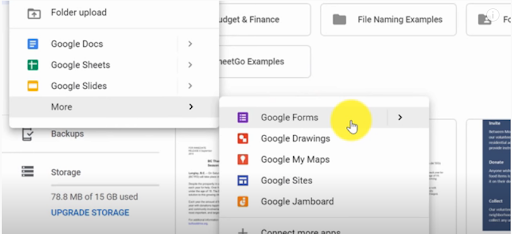
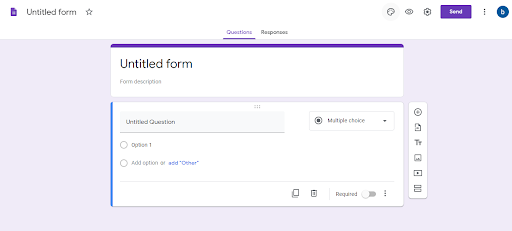
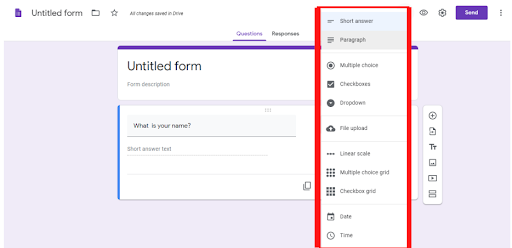
Different options appear on the right side of the questions, which include:
Now, on the top right corner, an icon for customization is present where four options are available:
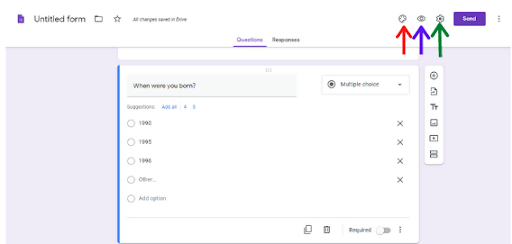
Besides ‘Customize’, the icon for ‘Preview’ is present. It lets:
Besides this, the ‘Settings’ icon presents three options- General, Presentation, and Quizzes.
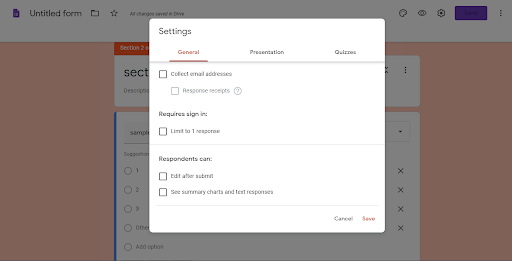
Now, in the ‘Responses’ section, you can:
After preparing the form, it’s ready to be sent out for response collection. So, when we hit ‘Send’, three options appear:
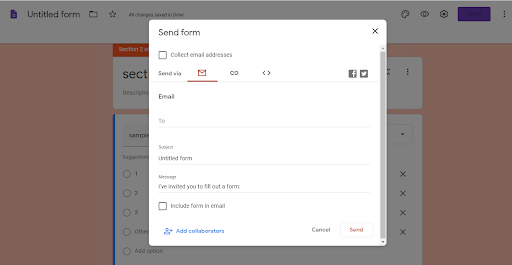
Now that you know what Google Forms brings and how to create a survey, let’s discuss the essential features an online survey tool should have. It’s time to let the cat out of the bag.
Any survey that gets the right result has one thing in common. They all come with different questions that pique the survey respondent’s interest and make them wanna answer. Questions can be presented correctly, whether long or short, using the right type. MCQs, Likert scale, open-ended, rating, and scale-based questions. Those are a few of the most popular question types in your surveys.
But does your online survey tool offer all these types? Google Forms certainly doesn’t.
Advanced conditional branching or skip logic plays a key role in giving a smooth survey experience to respondents. Because it removes questions that are irrelevant for a respondent based on their previous responses. This brings quality data, as respondents are asked questions that apply to them, ultimately improving their motivation to take the survey and answer promptly.
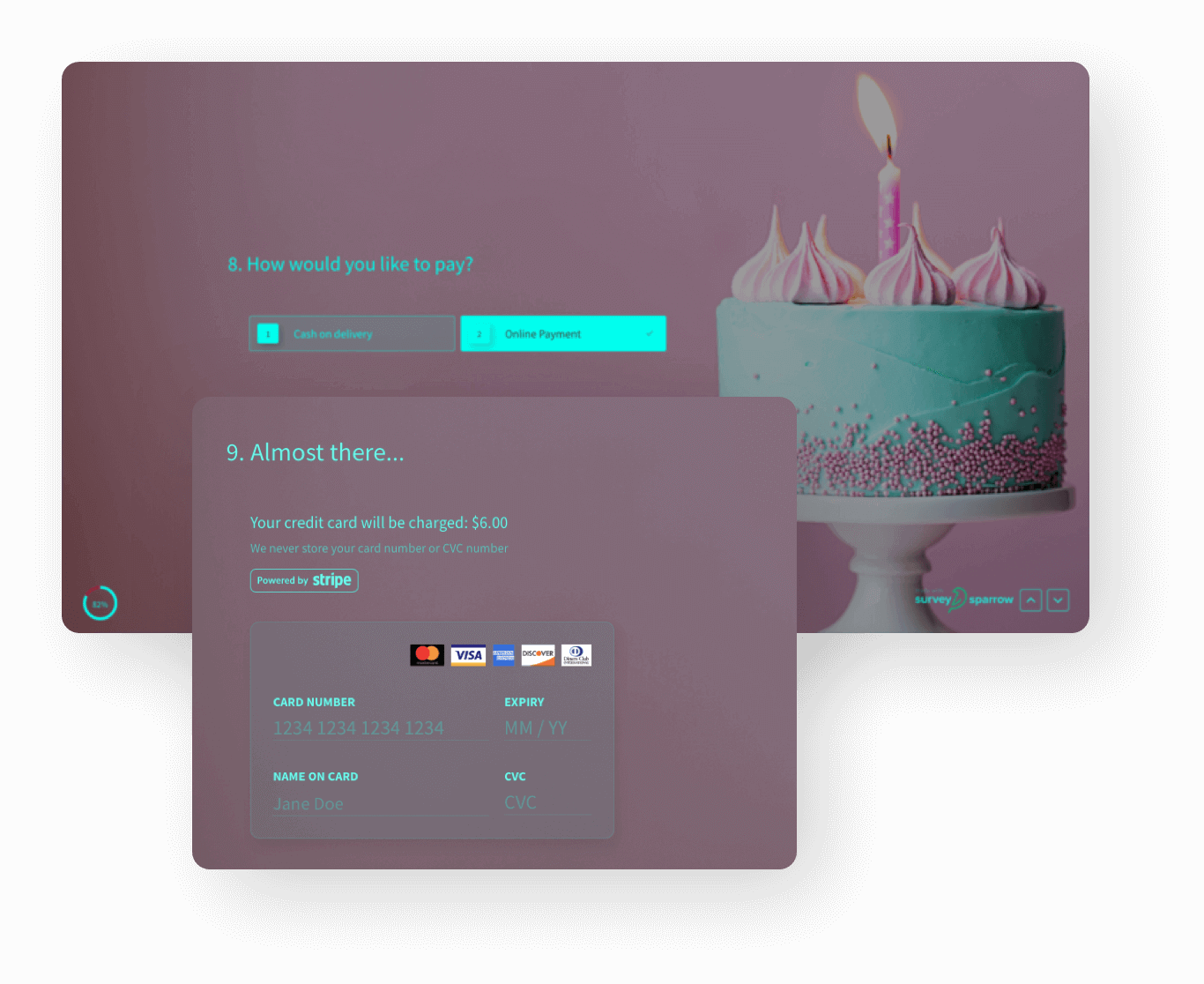
Sometimes, there are situations where the survey respondents do not want to reveal their identity. An excellent example is employee feedback surveys, where the employees are reluctant to reveal their identity if you expect them to give honest answers.
In that scenario, it is best to let them stay anonymous, which is precisely why your online survey tool should have the anonymity feature in its arsenal. Especially in the post-pandemic world, where people are pretty sensitive about their privacy and are skeptical about revealing their identity.
Password sharing, multiple licensing, and several authentications might sound like a great thing, but in reality, these increase the friction for all stakeholders and might cause confusion about who’s doing what.
We think collaboration should be allowed while conducting online surveys, but it should be done in a restricted manner so the leader or manager can control proceedings and give the right access to the right team members.
Right after seeing the features of an online survey tool, this is the next thing you should do because you don’t want to face troubles alone in the middle of a survey campaign! Plus, there’s a good chance you might need customer support’s help to use all the features properly. So, don’t compromise here. Go for the tool with the best customer support. You’ll never regret your decision.
As for Google Forms, you must mail them the issue, and their team gets back to you, primarily through email. And that, too, after 24 hours. Not cool!
Just like customer support, this is a feature you can’t compromise with. The security of your customer’s data is essential for the survey campaigns to succeed. While choosing your online survey tool, you gotta keep this in mind. So, ensure the survey tool encrypts the respondent data and builds processes around it to keep it secure.
People and companies like to use Google Forms a lot, that’s for sure. But why? What brings Google Forms its popularity? It’s crucial to talk about this before jumping onto anything else. So, get yourself a cup of coffee (if you haven’t already!), and we’re all set to start.
| Feature | Use Case |
|---|---|
| Auto-completion | Language prediction |
| Ease of Use | User-friendly interface |
| Pre-built Templates | Quick survey setup |
| Google Ecosystem | Seamless integration |
| Collaboration | Real-time team input |
| Skip Logic | Tailored questionnaires |
| Unlimited Surveys | Cost-effective data collection |
| Massive Integration | Seamless third-party tools |
| Completely Free | Budget-friendly surveys |
Google Forms comes with an autocomplete feature, where the answers get autocompleted with the help of predictive analytics. This feature is available in over 14 languages, including Spanish, French, German, Arabic, Chinese, to name a few. And it’s easily one of its most popular features.
Google Forms is the most accessible online survey tool to use. There are no doubts here. It may not be the most aesthetically pleasing survey tool, but for ease of use, it’s fantastic!
Google Forms comes with templates that can be used by anyone and everyone without needing any coding experience. Even those new to online surveys can get the hang of it with these templates.
Work request forms, feedback forms, order forms, and event registration forms are some of the most common templates available here.
All you need to do is select a template, add the customization options you need, input survey questions, and you’re ready. Simple and effective. What say?
If your business uses G Suite, navigating and using the entire suite of products, including Google Forms, becomes effortless. Every product in this suite is connected to the other one, so the information-sharing and storing process is seamless and quick.
One of the best features of Google Forms is adding changes, suggestions, and comments in real-time. So, if you’re working with a team for a survey, where every member is a stakeholder, exchanging information becomes a cakewalk with Google Forms.
If you wish to give survey respondents the option of skipping unrelated questions, Google Forms lets you do that with their skip logic condition. It’s great to have respondents from various segments answering questions that resonate with them, giving you small but highly focused data. Using Google Forms’ skip logic feature is a way to do that.
One of the coolest features of Google Forms is letting survey-takers conduct unlimited surveys for unlimited respondents. For companies working on a tight survey budget, Google Forms is a lifesaver!
No matter what you do, Google Forms has the integrations you need. You get all the integration options from MailChimp to Hubspot to Slack with Google Forms.
Well, this is the feature that makes Google Forms genuinely famous. It’s completely free! Yes, conducting online surveys using Google Forms would cost you exactly $0.
If you wish to use G Suite, the price starts at $6/user/month, which is dirt-cheap compared to the quality and features of the products there.
| Platform | Rating |
|---|---|
| G2 | 4.6/5 |
| Capterra | 4.7/5 |
Well, the features mentioned above, along with much more! That’s what makes SurveySparrow one of the best online survey tools available. And you don’t need to search on your browser to find all its top features; we’re doing that here. All you must do is keep reading.
With Survysparrow you get to create engaging and chat-like forms that can fetch you 40% more responses. Isn’t that cool? Plus, with the new AI survey in action, all you need to do is enter a prompt and let artificial intelligence do the magic. Additionally, you also get 1000+ pre-designed templates!
One of the most applauded features of SurveySparrow is its omni-channel experience management platform. Using this, businesses collect data by sending surveys on multiple channels, social media, or emails. Once the responses are collected, they analyze and store the final data in this management platform.
This and so much more is what you get with SurveySparrow’s management platform. Impressed, aren’t you?
With SurveySparrow, you can create online surveys for free and explore all the features. So, go ahead and start your trial today!

A personalized walkthrough by our experts. No strings attached!
For every business, their brand identity is essential. Why? Because it matters to their customers. Customers love to associate with a brand with a unique voice and identity in the market. And that’s looking to empower customers in more ways than just selling their products & services. SurveySparrow understands that, so they’ve built their white-labeling feature with time and dedication.
As a business, you can customize everything, from the URL to the brand logo, subject, and body of your surveys, easily using this feature. So, go ahead and check out the feature yourself. You’ll not be disappointed.
“Will customers talk about us in front of their friends?”
“Are we getting word-of-mouth referrals?”
“Are the customers spreading positive news about us?”
If, as a leader, you’re asking these questions, you and your teams need to conduct NPS surveys. SurveySparrow would help you do that with its hugely impressive built-in Net Promoter Score (NPS) module. With this, you’ll see who the Promoters, Passives, and Detractors are for your brand.
Now, promoters spread positive news about your brand, and you want them to grow. Conducting NPS surveys would be the first step towards that. These surveys would let you know who your Detractors are, and you can assign a representative for them to check if their customer experience is improving. All this is super easy and quick with SurveySparrow’s NPS module.
SurveySparrow stands out from the rest with its offline surveys feature. They empower teams to collect data from anywhere and anytime without having an active internet. So, when using this feature, conduct as many offline surveys as you want, connect multiple devices, and uniformly store this data. Sweet!
Focusing on customers shouldn’t mean you forget employees. Because they’re the ones responsible for keeping customers happy, which means, as a leader, you need to keep them happy too.
This is where SurveySaprrow’s 360-degree assessment comes in.
As with this feature, you get to upload all employee information in one go, invite them for an employee 360 evaluation with a single click, and get custom reports showing their strengths and weaknesses with a dedicated development plan.
Simply put, the 360-degree assessment module helps your employees grow while keeping them satisfied. After which, they’ll take care of your company’s growth!
Using SurveySparrow as your online survey software, get integration options with marketing tools like Hubspot, Mailchimp, Marketo, Eloqua, CleverReach, and more. It lets you integrate with tools like C-Connect, FreshDesk, and Jitbit Helpdesk for your customer support functions.
If you want to integrate SurveySparrow with productivity, email, analytics, and management tools, contact them and it’ll be done in no time.
Every feature of SurveySparrow is designed to promote accessibility and ease of use. As a leader or manager, you can set up sub-accounts under a single account for your teams. You can view surveys easily in these sub-accounts and folders; everything remains smooth and hassle-free.
How to create a survey in Google Forms? From selecting the template to sending the surveys, you know all about Google Forms and the survey creation process. Google Forms has its limitations, no doubt. But for teachers, graduate students, and small businesses, the ability to conduct free surveys to gain valuable information is priceless. And that’s what brings Google Forms to popularity.
You can use a Google Forms alternative like SurveySparrow for more features and advanced analytics. And you already know why that would be the right choice!
We hope this detailed guide helps you build surveys that get the intended result. SurveySparrow is here if you need help with your surveys.
Happy surveying!


Thousands of brands trust SurveySparrow to turn feedback into growth. Try it free today!


Best Of
12 MINUTES
11 May 2022

Best Of
12 MINUTES
16 September 2020

Best Of
12 MINUTES
12 November 2020

Best Of
11 MINUTES
16 March 2019

