Knowledge
What are On Site Surveys? Meaning, Benefits and How to Use it

TRUSTED BY BEST-IN-CLASS BRANDS



On site surveys are your direct link to website visitors. They allow you to ditch guesswork and get the real deal with user feedback.
But what exactly are they? And how do you effectively embed one into a website?
Let’s find out!
What is an On Site Survey?
On-site or on-page surveys are questionnaires designed to collect feedback from website visitors in real-time. They pop up based on what users do on the site, capturing thoughts right then and there!
The best part about them is that they are short and sweet. This makes it easy for visitors to share their thoughts quickly without wasting time or getting bored.
Website surveys are handy for figuring out what your audience wants, finding ways to keep them engaged, and testing survey ideas before going live. Moreover, they can be embedded at those crucial points where their opinions can help you make informed decisions.
But again, customers tend to ignore dull pop-ups. I would! Wouldn’t you?
For this, create conversational surveys and chat with them. It’s as simple as that. But don’t worry, I’ll also tell you how to do that. First, why don’t you check out this sample template created with SurveySparrow?
Website Usability Survey Template
Use This TemplateYou don’t need a coder’s brain to use this platform. Just copy the code and use it on your site. Yes, it’s as simple as that! We’ll talk more about SurveySparrow in a bit. But if you’re in a hurry, feel free to use and customize the above template.
Let’s move on to …
Importance of On-Site Surveys
It is important to know why having a survey on the website is so important. I thought of a few reasons:
- Visitor Engagement: By involving customer feedback in your decision-making process, you make them feel like they are a part of the system. Keeping them engaged leads to increased sign-ups and retention rates.
- Improve Website Usability: You can use it to understand where your customers face hiccups. Oh! Don’t just stop there. Take quick measures and give them the best user experience they can get.
- Boost Conversion: The insights will help you optimize various website elements. This can be call-to-action buttons, navigation menus, and form fields, which will help increase conversion rates.
- Campaign Effectiveness: By analyzing the feedback, you can easily see how a marketing campaign has affected your customers. With these insights, identify areas of improvement and work on them.
Now comes the interesting part…
How to Use On-Site Surveys on a Website
Website surveys can be highly beneficial if you know how to use them effectively.
First, we will start with the process. Then, once you’re clear on that, we’ll see how you can do it with a tool.
In any case, the first step is to…
1. Define Your objective
This is the most important aspect. You need to be clear about your goals before starting any endeavor.
Take a step back and breathe for a minute. Then, think about what you want to achieve with your efforts. The best way is to question yourself on a few things.
- Are you trying to gather feedback on specific pages or features?
- Is it to understand website usability or figure out pain points?
- Or, perhaps, you aim to improve conversion rates by changing the call to action.
It can be any of these, but be clear. This will help you create targeted questions that fetch precise information.
2. Create Engaging Surveys
Time is money. Yes! You need to keep chanting this while creating your surveys.
Your website visitors or audience are not there for the thrill of it. They landed on your page with a purpose, and it is extremely important to respect that.
Keep the surveys short and sweet. Don’t tire them out with long, tedious surveys with endless questions. Plus, everyone likes being talked to. Make sure you embed chat-like surveys that can be completed in a few minutes.
Pro Tips!
1. Mix a variety of question types (include both open-ended and close-ended questions)
2. Use the targeting option to display the surveys (exit intent or visited pages)
3. Have the backup of an advanced online survey tool. Yes, SurveySparrow is happy to help!
And that brings us to the next point…
3. Use an Advanced Tool
Why don’t I tell you how to use SurveySparrow for website surveys? It is easier to explain with the help of a tool I use. Right?
I’ll lay out the options first.
- You can create a survey from scratch with the drag-and-drop survey builder.
- If that’s too much work for you, use the AI survey feature or consider any one of the templates from a list of 1000+ pre-designed ones. You’ll find one that caters to your needs.
- Customize it with custom branding and white labeling to blend with your website.
Once that’s done, quickly click the share option, choose embed, and copy-paste the code onto your website’s script!
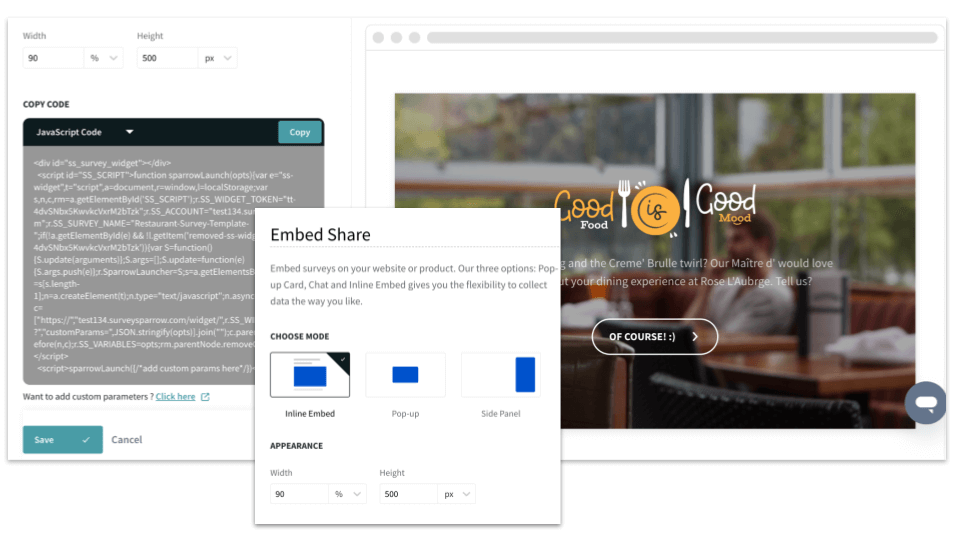
The next step is to collect and visualize the responses on the executive dashboard! The real-time reporting feature will help you make informed decisions without any delay. Spot bugs and areas that need improvement. Fix them right away! 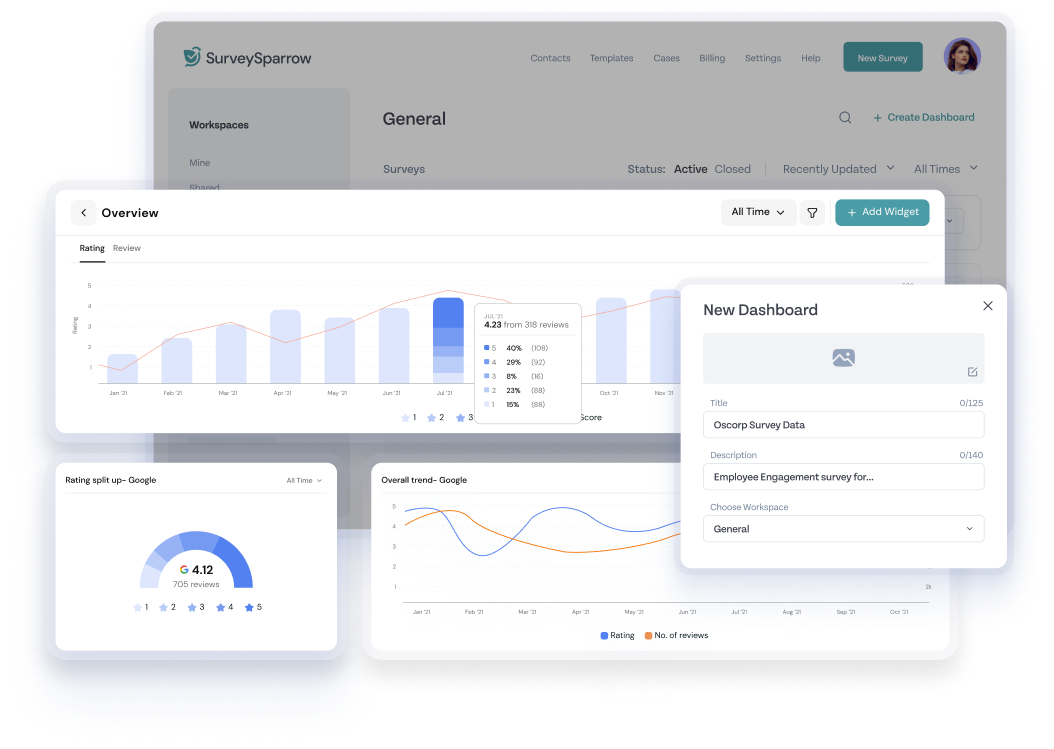
Why don’t you take SurveySparrow for a spin?
Sign up for free today and see how it can simplify your on site survey creation!
Why don’t we find some inspiration for the questions you might want to include in the survey?
On-Site Survey Questions
Surveys on the website can be placed at crucial touchpoints. I have divided them as per different requirements.
Here are a few questions you can consider:
Product Feedback Questions
- Which product features are most valuable in your day-to-day use, and why?
- On a scale of 1-10, how likely would you recommend this product to a friend?
- Is there a feature you wish our product had? If so, how would it improve your experience?
- On a scale of 1 (not valuable) to 5 (extremely valuable), how useful do you find our product’s AI Surveys?
User Intent
- What is your primary goal for visiting our website today? (Multiple choice options for browsing, comparing, purchasing, etc.)
- Have you already done some research on [product category] before visiting our website? (Yes/No answer)
- Have you encountered any technical issues while using our website?
- Do you have any specific questions about our products or services that we can help you with today? (for further clarification)
User Experience
- We’d appreciate your feedback! Which section of our website did you find most helpful in achieving your goals?
- Did the website navigation feel clear and intuitive? (Yes/No answer)
- How likely are you to return to our website based on your experience?
- Could we have done anything to improve your overall experience on our website? (for suggestions)
Customer Persona Definition
- What are some of your biggest challenges when shopping for [product category] online? (for specific pain points)
- Do customer reviews influence your purchasing decisions? Yes or No? If yes, how important is it on a scale of 1 (not much) to 5 (very important)?
- How do you prefer to receive communication from brands?
- Which social media platforms do you use most frequently?
Process Bottlenecks
- Could you tell us which part of our website you found most frustrating or where you encountered any difficulties? (for a specific issue)
- Can you pinpoint the stage where you encountered challenges, if any? (Multiple choice to particular steps in checkout)
- Did you experience any issues while navigating our website?
Abandonment Reason
- We noticed you didn’t complete your purchase today. Would you be willing to share what might have prevented you from doing so? Your feedback is valuable in helping us improve the checkout process. (Open-ended for specific reasons)
- Did you encounter any error messages or technical difficulties while completing your purchase? (Yes/No answer with optional open-ended follow-up)
- Would you like a discount code or special offer to encourage you to complete your purchase? (Yes/No with optional email capture if they answer yes)
You can remove any pre-populated question fields in the SurveySparrow templates and add these! You’ll have a customized website survey ready to use! The Wing feature will help you expand, compress, rephrase, and edit them however you want!
Wrap Up!
On-site surveys can add wonders to your page.
Whether you aim to boost your conversion rates, connect with your audience, or fine-tune marketing strategies, these surveys will have your back.
So why wait? Start asking the right questions at the right time!
Happy Surveying!
FAQs
1. How can I keep respondent answers and responses private for on-site?
To ensure respondents’ data stays private, make it anonymous, be clear about how you’ll use it, and follow rules like GDPR.
2. Can on-site surveys help with A/B testing?
Absolutely! They are handy for getting feedback on designs, content, or features you’re trying out.
3. How often should I do website surveys?
Keep it balanced! Try not to overdo it! Anything more can annoy your visitors.
Usually, doing surveys every few months is good, but you can do more during special events or campaigns.