Compare
Microsoft Forms vs Google Forms : Which is Better in 2024?

Article written by Kate William
Content Marketer at SurveySparrow

16 min read
30 May 2024


Compare
Article written by Kate William
Content Marketer at SurveySparrow
16 min read
30 May 2024
Microsoft and Google. If you have a laptop or a system, you’re probably using both. These 2 behemoths have revolutionized the way we see and use technology. They both offer an excellent suite of business products, with one of them being a form builder.
Both Microsoft and Google Forms are excellent form or survey builders in their rights. But if the discussion is about Microsoft Forms vs Google Forms, who wins? We will try to find an answer and discuss a few more topics.
Hop along, then. On we go!
If you are here, quickly peek at the comparisons; dive into the table below.
Even since Microsoft launched Forms in September 2018, it has garnered a massive audience looking to create online forms, surveys, quizzes, and polls quickly and hassle-free. With a clean interface and options aplenty, this form builder from Microsoft has many admirers.
Still, we would say it has features that people often miss or are hard to find. And we’ll talk about them, too. Up first, though, let’s have a quick intro about Google Forms.
Google Forms tool is a part of Google’s business toolkit. Because of Google’s association, it is easy to use and extremely popular. As a feature of Google Sheets, it was initially just a way to collect responses. In 2016, more useful and powerful features were added; now, it’s a separate product.
So, is Microsoft Forms better than Google Forms? Who wins in the Microsoft Forms vs Google Forms question? These 9 points of comparison will find that out!
But before that, while Microsoft Forms and Google Forms were pioneers in the field, the survey game evolved, and new players offered exciting features. One standout is SurveySparrow, which is worth a try if you are looking.
Try it out for Free.
To Get a detailed picture of how SurveySparrow is a great alternative to Microsoft Forms and Google Forms, see below.
Of the rest of us, here we go!
Our first point is to make sure an online survey tool is affordable, regardless of how great it is. Unless it fits your budget, it’s no use.
The next point of comparison is the kind of form designing process and experience Microsoft and Google Forms offer. Let’s see;
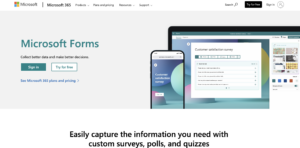
The next round in the Microsoft Forms vs Google Forms matchup is templates.
After comparing the designing process and templates, the available themes in both these form builders are our next point of evaluation.
In every online survey tool, team collaboration features are crucial. Why? Because a survey campaign involves a lot of stakeholders and collaboration features make it easy for them to contribute. Time to see in whose favor the Microsoft Forms vs Google Forms conversation is tipping;
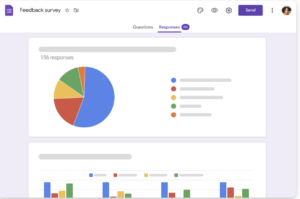
Even if you’re collecting quality, targeted data, it’s useless without proper analysis. Let’s carry out this crucial point of comparison, then;
For 2023 and beyond, a mobile app is a must-have functionality for online survey tools.
Google Forms
The effectiveness of a form also depends on the type of video or images you can use. Let’s compare both the form builders on this aspect:
Imagine this.
If you’re running a carefully designed survey campaign but the surveys just won’t open. In that case, the survey software’s support team could be your savior. Do Microsoft and Google Forms offer a support team like this? Let’s see;
| Aspect | Microsoft Forms | Google Forms |
|---|---|---|
| Ease of Use | Clean and modern interface | Simple and user-friendly |
| Integration | Works well with Office 365 | Part of Google Workspace |
| Collaboration | Co-authoring and sharing | Collaborative editing |
| Question Types | Offers various question types | Basic question types |
| Templates | Limited templates available | Wide selection of themes |
| Data Analysis | Provides basic analytics | Integrates with Google Sheets |
| Customization | Limited customization options | Extensive customization |
| File Uploads | Supports file uploads | Supports file uploads |
| Logic & Branching | Limited logic and branching | Limited logic and branching |
| Offline Access | Not available | Limited offline use |
| Mobile-Friendly | Mobile-friendly | Mobile-friendly |
| Pricing | Included with Office 365 | Included with Google Workspace |
Microsoft Forms Pros:
Microsoft Forms Cons:
Google Forms Pros:
Google Forms Cons:
Remember that the choice between Microsoft Forms and Google Forms should depend on your specific needs and the ecosystem you are already using. Both have their strengths and weaknesses, so it’s important to consider your organization’s requirements when deciding.
Ranked as the #1 survey software by softwareworld.co, SurveySparrow has flown a long way since 2017 – from a simple survey software to an omnichannel feedback solution. But you may be wondering why SurveySparrow is the best Microsoft and Google Forms alternative. Well, let us surprise you with these features;

1. Exceptional Response Rates: SurveySparrow boosts survey response rates by up to 40% thanks to its engaging conversational survey flow and appealing design.
2. Advanced Features: SurveySparrow offers more advanced features than both Google and Microsoft Forms combined. It’s a cloud-based survey software accessible from any device.
3. No Coding Required: With SurveySparrow, you don’t need coding skills. Input your information into the forms and send them out effortlessly.
4. Conversational Interface: Enjoy a conversational interface, multiple question types, custom logic (Skip & Display), and variables to make your surveys feel more engaging and personalized.
5. Diverse Survey Types: Whether you prefer classic surveys, chat-style surveys, NPS, 360° feedback, or offline surveys, SurveySparrow has you covered.
6. Extensive Customization: Choose from 500+ templates, video backgrounds, multi-language surveys, answer randomization, question morphing, and multi-file upload to customize your surveys to perfection.
7. Branding Options: SurveySparrow allows you to match your brand with custom rebranding options, including logo, CSS, domain, email, and SSL.
8. Versatile Distribution: Expand your survey reach through SMS, email, embedding, weblinks, integration with MS Teams and Slack, QR codes, and website chatbots.
9. Automation and Integration: Save time with features like survey redirect, 4,500+ integrations, webhooks, API access, and real-time reporting. Manage feedback effectively with response tracking, survey reminders, case management, and recurring surveys.
10. Affordable Pricing: SurveySparrow offers an entry price starting from $0 per month, with a generous 14-day free trial on all plans.
Check it out for Free!
With its versatile tools and features, all for free, Google Forms is a surveyor’s dream. From uploading documents to creating cool invitation templates, you can do pretty much everything using Google Forms, and for free! Yes, it’s not the best tool for a big, goal-oriented survey campaign, and it doesn’t have a mobile app to use. Still, based on our points of comparison, this form builder from Google is better than Microsoft Forms.
Make no mistake, Microsoft Forms is a good tool with a very simple-to-use interface but doesn’t offer a compelling enough case when stacked against Google Forms. The features, however, are making their way—so, exciting times ahead for people using or willing to use Microsoft Forms.
A lot is left to be desired in both these form builders. But you already know the best Google and Microsoft Forms alternatives! Yes, SurveySparrow’s team is waiting to have a cool chat with you. Danke!


Thousands of brands trust SurveySparrow to turn feedback into growth. Try it free today!
Alternative
12 MINUTES
25 July 2021

Compare
14 MINUTES
10 February 2023
Compare
14 MINUTES
25 January 2024
Compare
11 MINUTES
27 August 2023
14-day free trial • Cancel Anytime • No Credit Card Required • No Strings Attached
14-day free trial • Cancel Anytime • No Credit Card Required • No Strings Attached