General
How To Make A QR Code For Google Forms in 2024

TRUSTED BY BEST-IN-CLASS BRANDS


Are you wondering if you can create a QR code for Google Forms? The answer is a resounding yes!
A Quick Response (QR) Code is a two-dimensional barcode that can be scanned by any smartphone. A QR survey has an embedded link to the online survey, which allows you to easily collect customer feedback.
Now, Does Google Forms have a QR code generator? Not really.
It doesn’t have a built-in feature for generating survey QR codes. But is it possible? Yes! There’s always a way. And I have broken it down into five simple steps.
Here’s what we’ll cover:
- 5 Simple steps to create a QR code in Google Forms
- Cons of creating QR code for Google Forms
- An Easier way to Create QR code Surveys with SurveySparrow
Let’s not beat around the bush. Why don’t we address the elephant in the room right away?
Off we go!
How Do You Make a QR Code For Google Forms?
Hey, it is not as complex as you think. All you need is a QR code generator. Add the link, create a code, and voila! Your form will be ready to be shared.
But don’t worry, I won’t leave you hanging.
Here’s an easy-to-follow, step-by-step guide.
Step 1: Create a Google Form
Now, we won’t go into detail about creation. But if you want a guide for that…
Check Out How to Create Google Forms
But here’s a quick overview for those who have a faint idea…
- Log in to your Google Form Account and choose a Blank Form or one among the listed Templates.
Let’s say you chose the blank form. Now, it’s time to customize it to suit your needs.
- Give the form a title and add questions by clicking the (+) to the right.
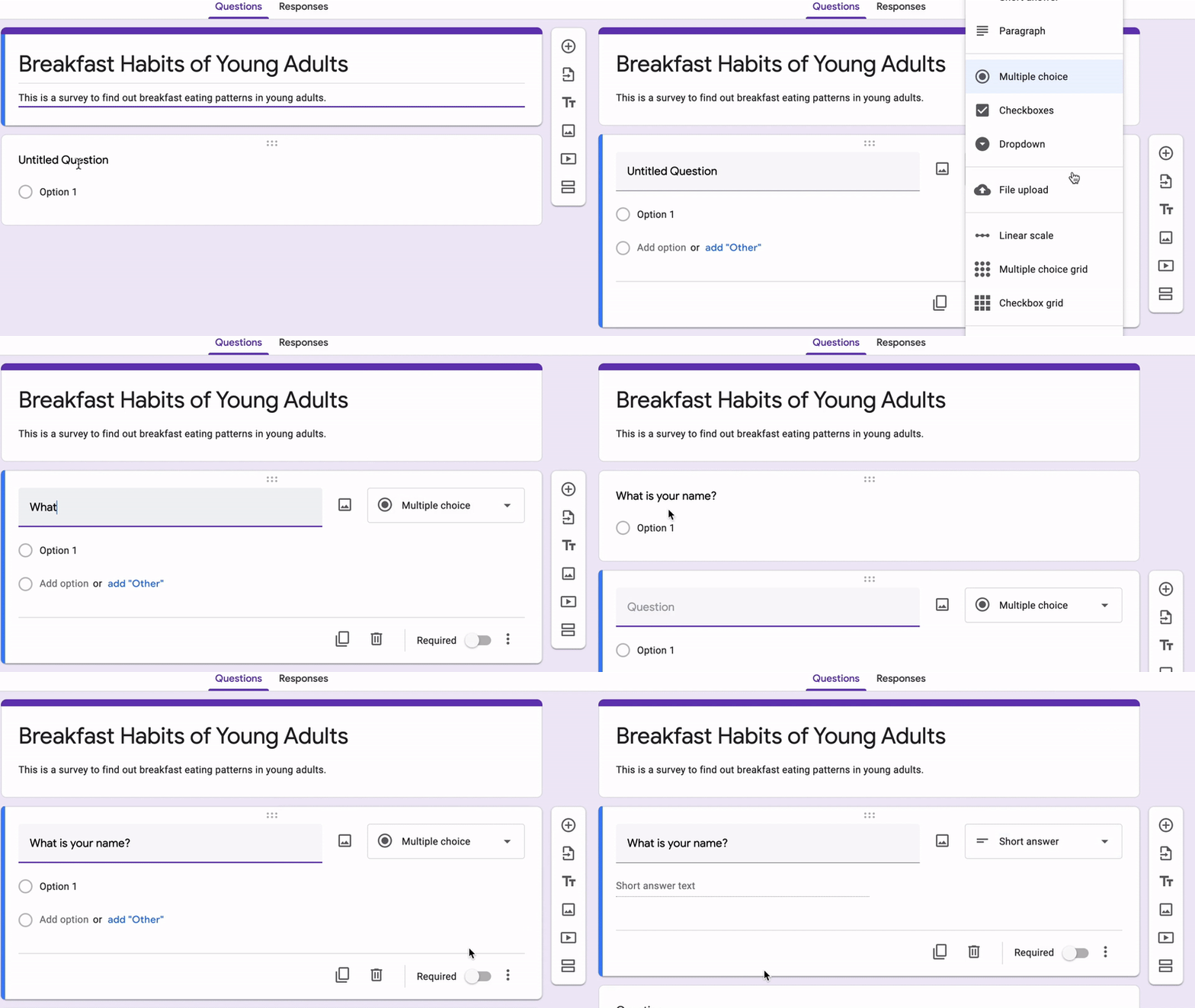
Here, you can upload files, change the layout, and add sections to break the form into capsules.
- Once that’s done, it’s time to share your survey. In Google Forms, you can share as a quiz, presentation, or general form. Take your pick.
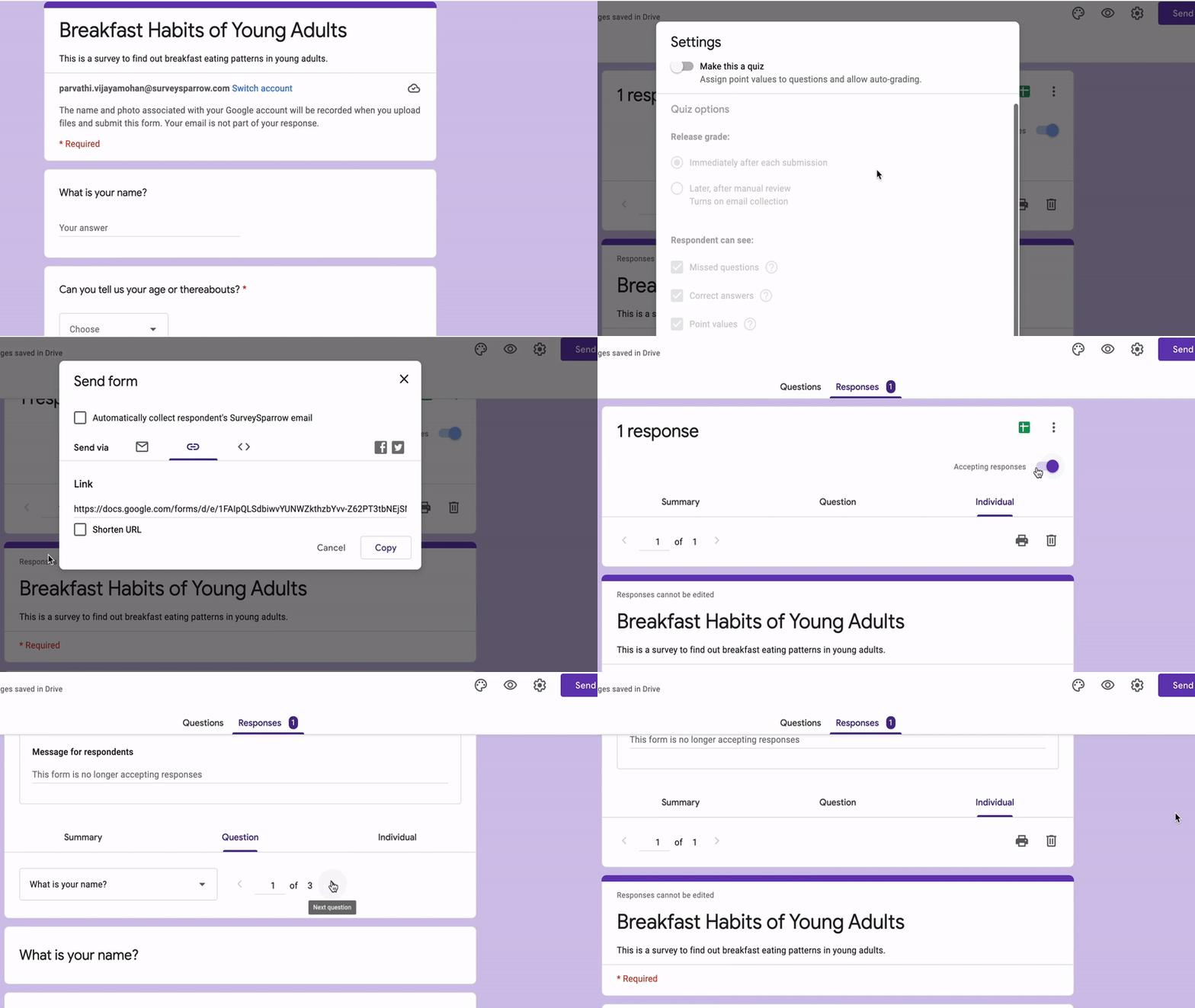
Ultimately, you will see three sharing options: email, shareable link, and HTML embed.
Step 2: Copy the Sharable Link
Our target is the middle one…
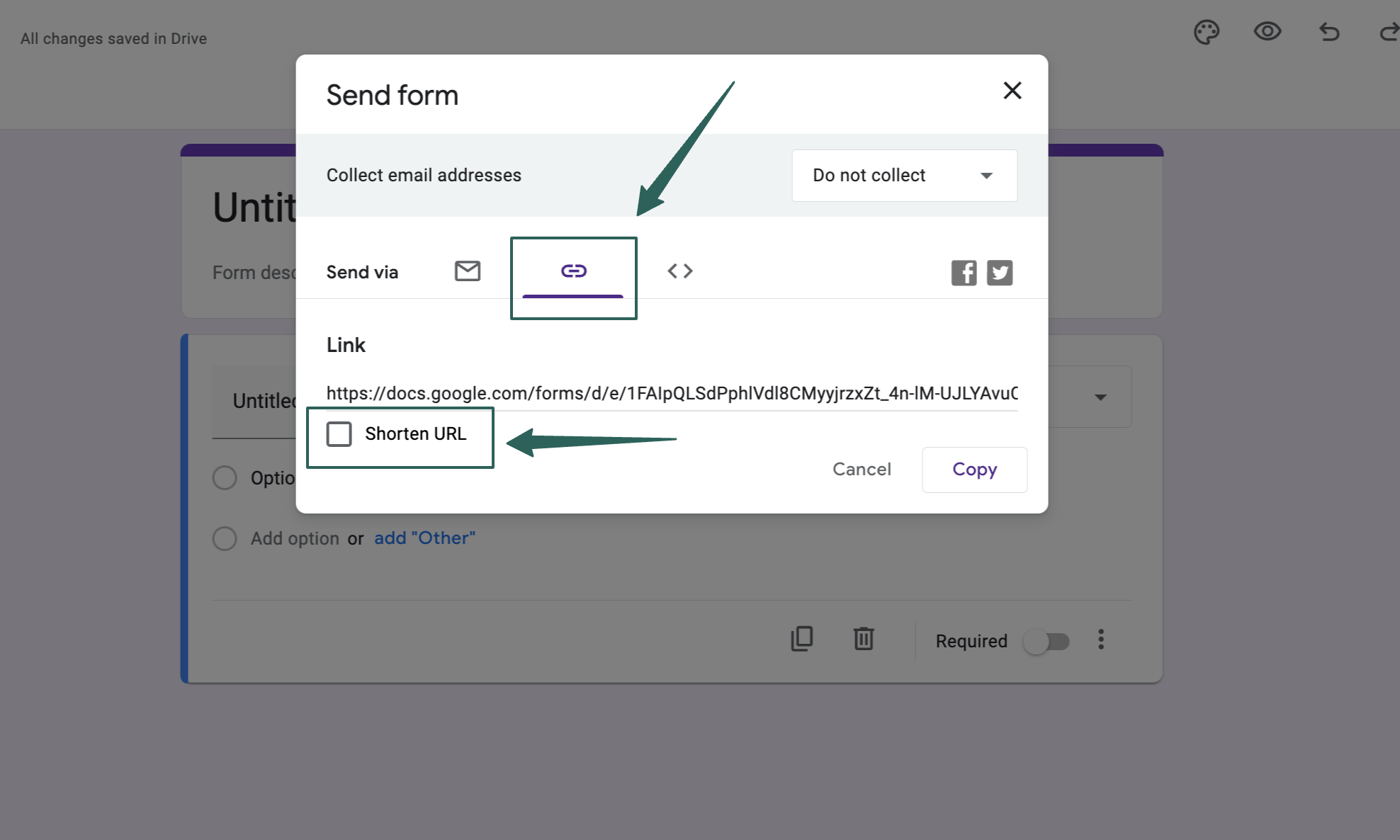
You can click on the “shorten URL” box and copy the link.
Step 3: Paste in a QR Generator
You’ll need a QR generator now. Go to the website, copy-paste the URL, and press enter.
Once you paste the Google Form link, you can customize the code, colors, frames, patterns, logos, background images, and fonts to match your brand’s style and theme.
Once that’s done, download the QR code as PNG, EPS, PDF, or print.
Voila! Your QR code for Google Forms is ready!
But again, just as the platform lacks in-built features, it has a few more downsides.
Cons of Using Google Forms for QR Code Surveys
- Double the effort! You have to move from one platform to the other. This confuses the users.
- No Offline Access! Even if you find your way out, you can’t access a form without the internet.
- There are no advanced features or customization options. The platform is suitable primarily for those who have basic form needs.
- The platform has very limited Logic and Branching capabilities.
- Finally, there are restricted third-party integrations. Yes, you can connect with the Google platform, but then what? The options are minimal.
Though free and easy to use, Google Forms might not be the right choice if your needs are more advanced. If you are looking for a better alternative, why don’t you try SurveySparrow?
SurveySparrow for QR Code Surveys
Surveysparrow offers a no-code form builder with which you can create engaging conversational forms! With the platform, you can get 40% more responses and boost customer loyalty!
See this sample template, for instance…
Product Market Research Survey Template
Use This TemplateThat’s not all…The advanced features include:
- Built-in QR Code Generator: No need for platform hopping! A sharable QR code will be available once you build your surveys.
- Skip and display logic: Show only the questions that matter to the user according to their previous answers.
- White-Label Surveys: Customize your surveys with your brand’s color, logo, and fonts to match your brand’s style effortlessly.
- Executive Dashboard: Once you have collected the data, visualize it with charts and graphs to dive into the heart of the matter!
- Secure Data: The SSL from a trusted reseller like SSL2BUY helps build safe connections, custom domains, and secure surveys
- Third-Party Integrations: You can connect your surveys and forms with various platforms and streamline your workflow. Hubspot, Zapier, Mailchimp, Slack, and Salesforce are popular platforms.
Let me walk you through the process…
How to Create a QR Code Survey With SurveySparrow
It’s simple!
Step 1: Sign in
Log in to your SurveySparrow Account.
You can start with a 14-day free trial if you don’t have one.

Once that’s done…
Step 2: Create and Customize
You can create one from scratch or choose one from the 1000+ pre-designed templates. I suggest you try it out with the attached free template.
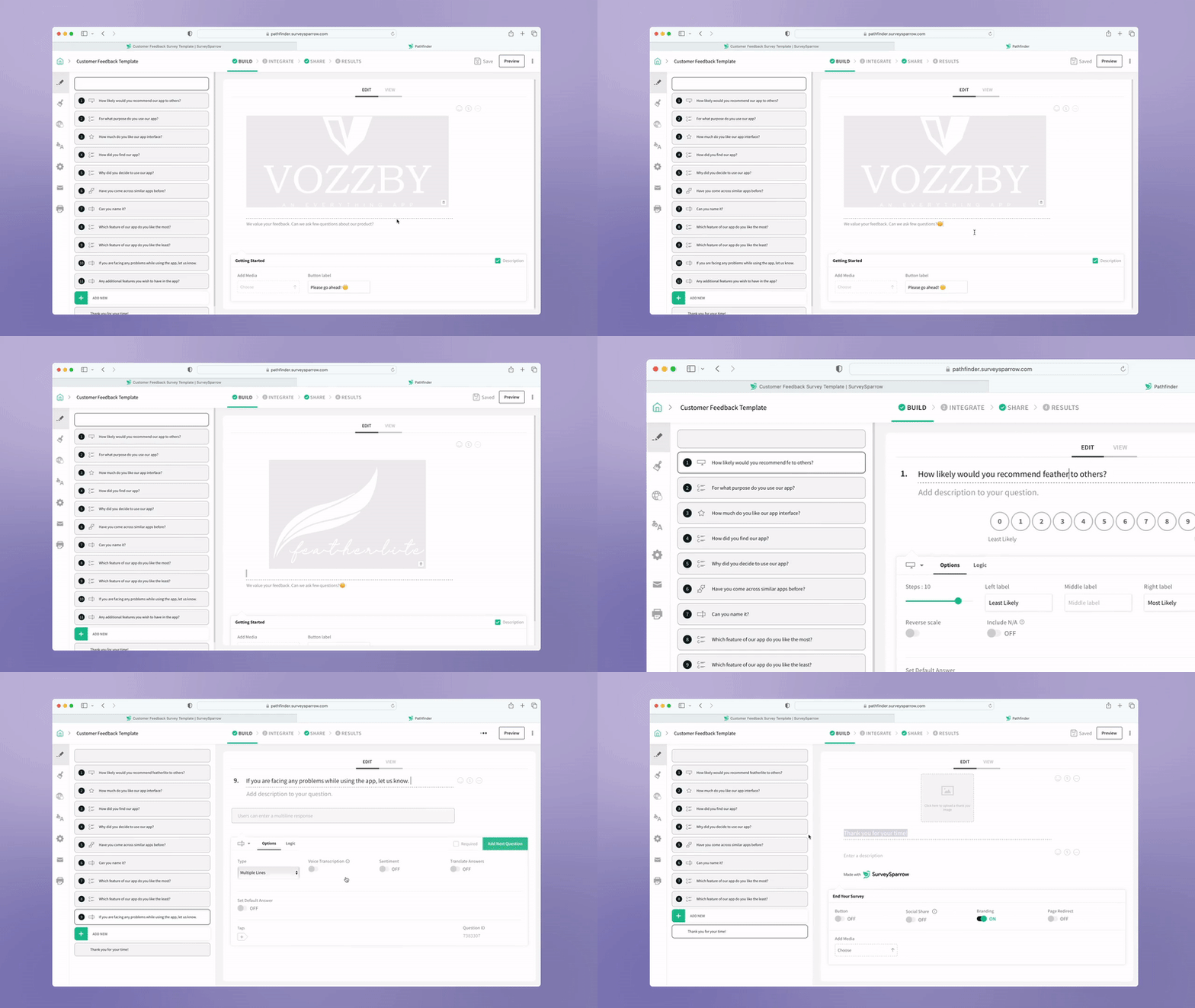
If you want a detailed guide:
Check out this help article on How to Create a Survey Using SurveySparrow
Now it’s time to…
Step 3: Generate a QR Code
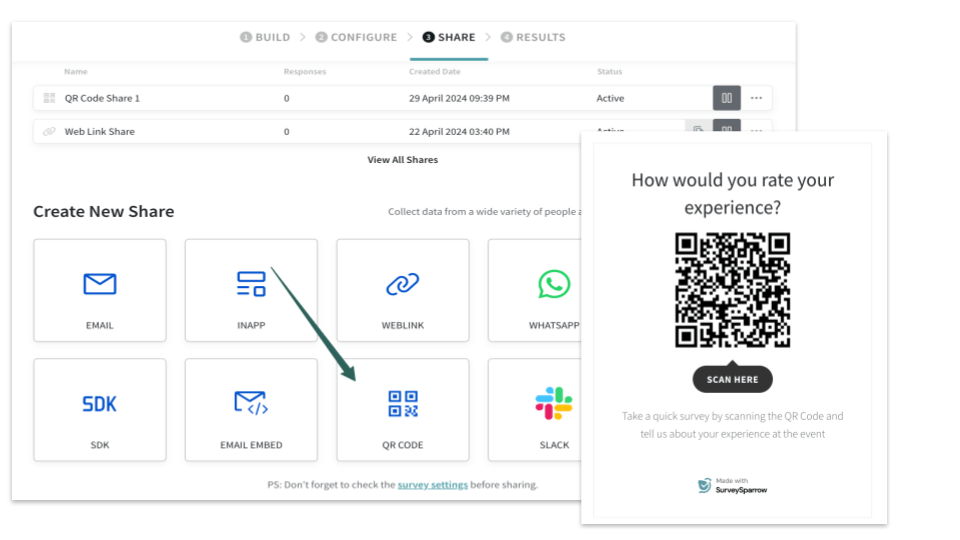
Right on top, click on Share. In the array of options, choose QR Code. You can give a title for the survey, add a description, remove SurveySparrow branding, and even choose to make it anonymous to ensure user privacy.
There you go, your very own QR code survey from a single platform.
Why don’t you take the platform for a free spin? Sign up today!

Create a QR Code Survey
A personalized walkthrough by our experts. No strings attached!
But again, if you still choose to opt Google forms, there’s one more thing you should know before you go…
When should I use a QR code for Google Forms?
In a survey by Google, 94% of respondents reported using their smartphones to take surveys. – Source
Using a Google Forms QR code can be particularly handy in the following situations:
- In-Person Events: If you’re hosting workshops, conferences, or any event where you want to gather immediate feedback from attendees, a QR code on handouts or posters can make it easy for them.
- Customer Feedback: A QR form on receipts, tables, or walls can encourage them to share their thoughts effortlessly.
- Product Surveys: If you’re a product manager or marketer looking for feedback, include a QR code on product packaging or documentation.
- Employee Surveys: You can use QR codes on posters to encourage employees to participate in surveys related to company culture or employee satisfaction.
- Education and Training: Teachers and trainers can use QR to distribute quizzes, assessments, or surveys to students. It’s a quick way to engage learners.
- Restaurant Menus: In the post-pandemic era, many restaurants have replaced physical menus with Scannable QR codes that customers can scan.
- Marketing Campaigns: QR codes can be included on promotional materials or landing pages when running marketing campaigns or contests.
Suggested Read
How to embed Google Forms on your webpage
How to Add Tables in Google Forms
Wrapping Up
One of the best things about QR codes is that they are super accessible! Share them via WhatsApp, email, webpages, or print them anywhere—it all works.
But creating a QR code for a Google Form? Not so easy. It’s a time-consuming process, especially if you have multiple surveys.
That’s where SurveySparrow shines as the best Google Forms alternative. It makes creating QR code surveys a breeze. Take our free trial and see for yourself!
Need a demo? Connect with our team, and they’ll set everything up for you. Keep surveying, and keep growing!
Create a QR Code Survey
A personalized walkthrough by our experts. No strings attached!