Customer Experience
Customer Experience vs. User Experience: Key Differences and Examples

Article written by Kate Williams
Content Marketer at SurveySparrow

10 min read
27 July 2023


Customer Experience
Article written by Kate Williams
Content Marketer at SurveySparrow
10 min read
27 July 2023
Have you ever had a memorable encounter with a brand that left you feeling valued and satisfied? Or perhaps you’ve used a digital platform that was so intuitive and seamless that it made your life easier. These exceptional experiences are the result of careful attention to two crucial elements: customer experience (CX) and user experience (UX).
Then again, have you ever pondered the differences between CX and UX? These two terms often intertwine in discussions about crafting unforgettable interactions with brands and digital platforms. If you’re also one of them, worry not! Let’s dive into the realm of customer experience vs. user experience.
Customer experience (CX) encompasses every interaction and touchpoint a customer has with a brand throughout their journey. It includes pre-purchase interactions, the purchase itself, and post-purchase support. CX focuses on the emotional aspect of the customer’s journey, aiming to build trust, loyalty, and satisfaction. A positive customer experience ensures customers feel valued, appreciated, and understood, leading to long-term relationships.
What’s the goal?
The goal of CX is to make customers feel valued, appreciated and understood. It’s all about building trust, loyalty, and long-term relationships. Think about the last time you had a phenomenal experience with a company. Maybe the support team went above and beyond to solve your issue, or perhaps the packaging of your order made you feel like you were opening a gift. Those little moments leave a lasting impression and make you want to shout from the rooftops about the brand.
User experience (UX), on the other hand, concentrates on the design and usability of a product or service. It encompasses the user’s interactions, perceptions, and emotions while engaging with a digital platform, website, or application. UX aims to make the user’s journey intuitive, efficient, and enjoyable, focusing on aspects such as navigation, ease of use, and visual design.
Imagine opening a mobile app and feeling instantly at ease. The interface flows naturally, the buttons are right where you expect them to be, and the visuals are eye-catching. It’s like the app knows you and your needs even before you do! That’s the power of UX at play. It’s all about removing friction, simplifying complex tasks, and providing a delightful experience that keeps users returning for more.
While CX and UX share similarities, they have distinct foci and scopes. The primary difference lies in their objectives and the entities they prioritize—customers and users, respectively. CX emphasizes the customer’s journey and overall impression of a brand, whereas UX concentrates on designing enjoyable and efficient interactions with a product or service.
CX involves various touch points beyond the digital realm, encompassing both online and offline interactions. It addresses emotions, perceptions, and satisfaction at every stage of the customer’s journey. On the other hand, UX refers explicitly to the user’s experience with digital platforms and aims to optimize usability, functionality, and visual design.
Let’s take a deeper look at the differences.
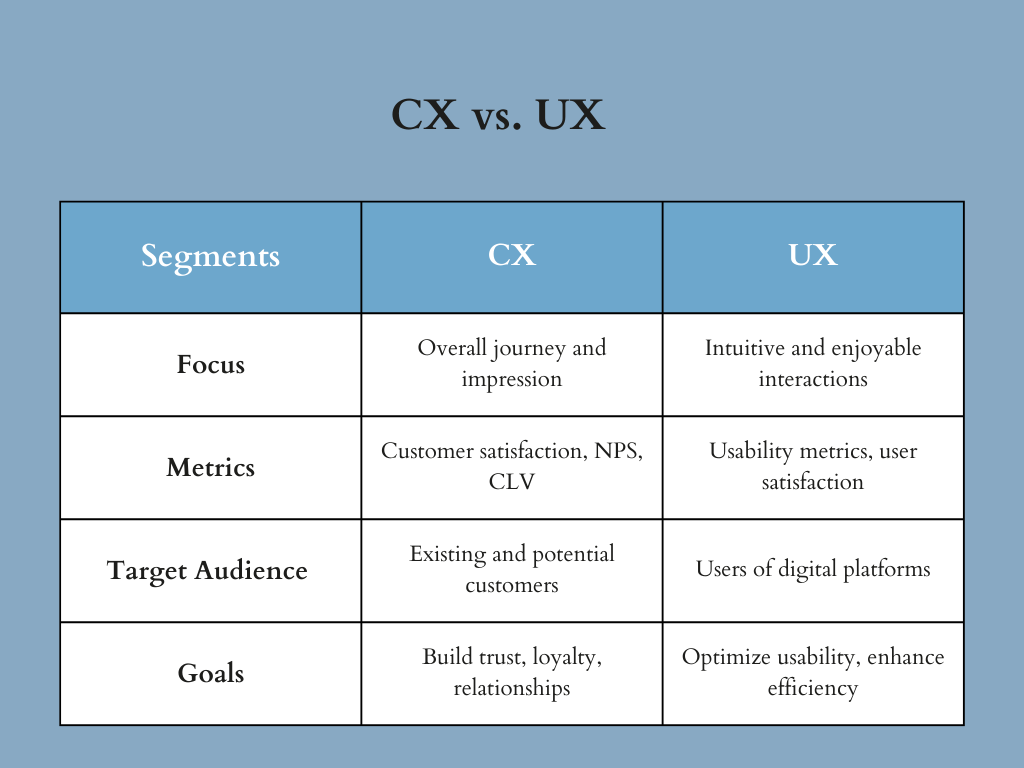
Are you wondering, why care about the difference between CX and UX?
Well, you should because:
While we are talking about the key differences between CX and UX, it is also important to see how well they work together.
CX and UX are not isolated elements; they work hand in hand to shape the overall experience that customers and users have with a brand. Let’s dive into how CX and UX collaborate and complement each other:
Now, let’s dive into the tasks involved in both customer experience (CX) and user experience (UX). These examples will shed light on the specific responsibilities undertaken by CX and UX teams to create remarkable experiences.
These tasks exemplify how CX and UX teams collaborate to gather insights, enhance usability, and create experiences that resonate with customers and users. To streamline and simplify these tasks, consider leveraging a powerful survey and customer experience platform like SurveySparrow.
SurveySparrow offers user-friendly survey tools that enable CX and UX teams to collect valuable feedback, analyze customer data, and gain actionable insights.
By integrating SurveySparrow into your CX and UX processes, you can streamline your data collection efforts, enhance customer understanding, and optimize your digital experiences. Sign up for SurveySparrow today and unlock the full potential of CX and UX collaboration!
Now you know why businesses must prioritize both CX and user experience UX.
While CX focuses on the emotional aspect of the customer’s journey, UX centers around designing efficient and enjoyable interactions with digital products and services. By understanding the differences and fostering collaboration between CX and UX teams, organizations can create exceptional experiences that delight customers and users alike.
Remember, seamless integration of CX and UX leads to increased customer loyalty, positive word-of-mouth, and a competitive edge. So, leverage the power of CX and UX to create remarkable experiences that set your brand apart.
Ready to level up your customer experience and user experience strategies? Explore the possibilities of customer experience vs user experience on SurveySparrow. If you’re looking for insights on enhancing your strategies, SurveySparrow is here to help. Sign up today to unlock a wealth of resources, expert advice, and powerful survey tools to optimize your customer and user experiences.


Thousands of brands trust SurveySparrow to turn feedback into growth. Try it free today!


Best Of
7 MINUTES
11 May 2021

Customer Experience
18 MINUTES
4 April 2024

Best Of
14 MINUTES
30 April 2021

Customer Experience
13 MINUTES
9 March 2019
14-day free trial • Cancel Anytime • No Credit Card Required • No Strings Attached

